

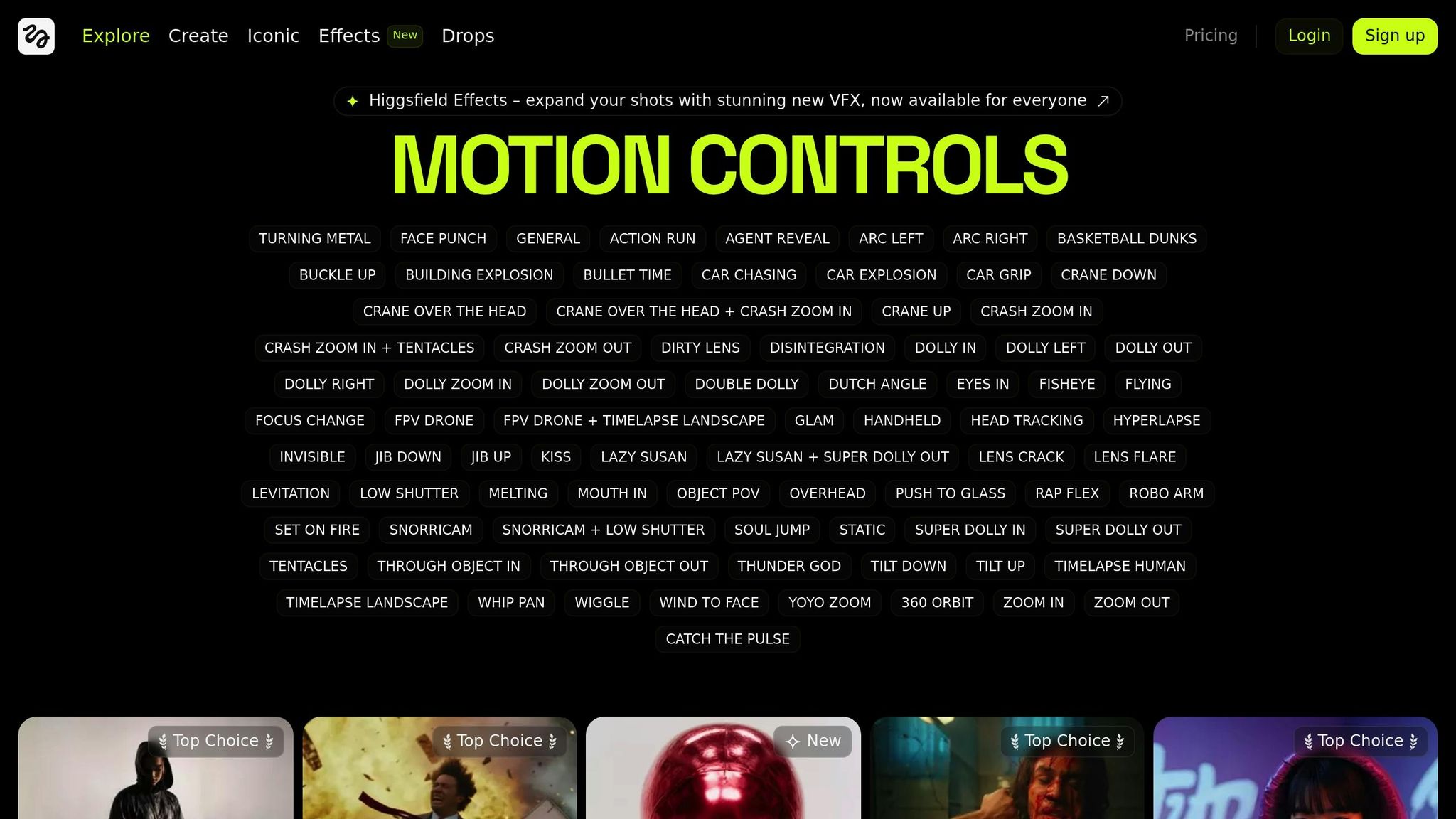
Higgsfield’s AI-powered video tool lets you create professional, cinematic videos from still images with just one click. Its motion library offers over 50 camera movements, including crane, dolly, and orbital shots, while the new Higgsfield Mix feature enables combining multiple motions for unique effects. Perfect for social media, it supports various formats like Instagram, TikTok, and YouTube. Start by uploading high-quality images, use precise prompts like "Crane Down", and layer motion effects for impactful results. Optimize videos further with overlays, music, and smooth transitions. Tailor your content to platforms for maximum engagement.
Setting Up Higgsfield‘s Video Tool
Choosing the Right Image
Pick an image that’s sharp, well-lit, and has a clear subject. This helps the AI interpret the scene better and apply motion effects effectively. A good image makes all the difference in the final result.
Navigating the Dashboard
The Higgsfield dashboard is designed to simplify your workflow. Start by uploading your image and previewing it to ensure it meets the quality standards. Use specific terms like "Crane Down" to define the camera motion you want. Experiment with generating multiple variations to explore different results.
Creating High-Impact Videos
Using Motion Effects Library
Higgsfield’s motion effects library offers tools for creating professional-level video content. With the April 2025 release of Higgsfield Mix, you can now combine multiple motion controls into a single shot for stunning results.
Here’s how to make your videos stand out:
1. Start with Dynamic Camera Moves
Select impactful moves like bullet time, robo arms, or orbital shots. Align these moves with your story’s tone. For example, use sweeping crane shots for dramatic reveals or crash zooms to heighten intensity.
2. Combine Motion Controls
Higgsfield Mix allows you to layer effects for distinct visuals. Imagine pairing levitating figures with drone-like sweeps or combining orbiting shots with dramatic lighting effects.
| Motion Type | Best Used For | Emotional Impact |
|---|---|---|
| Bullet Time | Action sequences | Dramatic tension |
| Crane Down | Scene establishment | Grandeur |
| FPV Drone Chase | Dynamic movement | Immersion |
| Orbital Shot | Character focus | Connection |
Next, you’ll need precise prompts to take full advantage of these effects.
Writing Effective AI Prompts
Crafting the right prompts is essential for controlling camera angles and scene composition.
"Higgsfield AI doesn’t just generate video – it choreographs cinema."
Follow these tips to get the most out of your prompts:
- Be specific with camera directions and visual style.
- Experiment with multiple versions to explore creative options.
You can further enhance your videos by:
- Adding custom overlays
- Syncing with matching music
- Applying smooth transitions
The latest update introduces 10 new motion controls designed to add speed, tension, and a cinematic edge to your content.
"From documentary-style flyovers to dreamlike orbits, your next cinematic vision is just a prompt away."
Social Media Platform Optimization
Video Format Guidelines
Higgsfield’s AI-powered video creation tool makes it easier to create videos tailored to the unique requirements of various social platforms. Here’s a quick breakdown of the recommended formats:
| Platform | Recommended Format | Aspect Ratio | Max Duration |
|---|---|---|---|
| Instagram Feed | Square/Portrait | 1:1, 4:5 | 60 seconds |
| Instagram Stories | Portrait | 9:16 | 15 seconds |
| TikTok | Portrait | 9:16 | 180 seconds |
| YouTube | Landscape | 16:9 | No limit |
| Square/Landscape | 1:1, 16:9 | 10 minutes |
Higgsfield’s motion library is built to support all these formats seamlessly.
These recommendations set the foundation for creating videos that fit perfectly on each platform. Next, we dive into strategies tailored for specific platforms.
Platform-Specific Best Practices
Boost your video engagement with these tips:
Instagram and TikTok
- Add dynamic effects like whip pans to grab attention instantly.
- Use fisheye or arc movements to create engaging, immersive stories.
YouTube and LinkedIn
- Incorporate crane and dolly shots for polished, professional intros.
- Combine multiple camera moves to craft smooth, high-quality B-rolls.
- Take advantage of Higgsfield’s transitions for seamless scene changes.
Want better results? Keep these two points in mind:
- Match Motion to the Platform Align your camera techniques with the platform’s style. For example, TikTok works well with snorricam movements for a personal, up-close feel.
- Focus on Mobile Optimization Layer effects thoughtfully and ensure your videos have clear focal points and easy-to-read overlays to make them stand out on mobile screens.
sbb-itb-9ef3630
How To Create PERFECT Camera Movements with AI #Higgsfield #aifilmmaking #aitools
Conclusion: Next Steps with Higgsfield
Here’s how to make the most of Higgsfield to create professional-quality videos:
Use High-Quality Images
Start with sharp, well-lit images to ensure clarity. Higgsfield supports a variety of visual styles, from VHS aesthetics to cinematic effects, allowing you to set the perfect tone for your content.
Write Clear Prompts
Be specific with your instructions. Instead of vague terms, use precise directions like "Crane Down" or "Orbit". This ensures the AI generates camera movements that match your vision.
Combine Motion Effects
Take advantage of Higgsfield Mix to layer multiple motion controls. This feature, introduced in April 2025, lets you create intricate, multi-layered sequences that elevate your storytelling.
Refine Your Videos
Polish your content by:
- Adding overlays
- Syncing music
- Applying smooth transitions
- Iterating to get the best results
These techniques not only improve your creative output but also make your videos more engaging for mobile and social platforms. With these tools, you can create attention-grabbing, professional videos tailored for any audience.
FAQs
How does Higgsfield’s AI decide the best camera movements for turning a single image into a dynamic video?
Higgsfield’s AI uses advanced algorithms to analyze your input and offers over 50 unique camera movements to choose from. You can select a motion style that best fits your vision, transforming a single image into a captivating, cinematic video.
This intuitive tool is designed to make it easy for anyone to bring their creative ideas to life, whether it’s for storytelling, marketing, or social media content. Simply pick the movement that matches your style, and let the AI handle the rest!
How can I write effective AI prompts to create stunning cinematic effects with Higgsfield’s tool?
To craft effective AI prompts for Higgsfield’s tool and achieve breathtaking cinematic effects, focus on two key steps. First, generate a compelling scene using a high-quality image creation tool. Then, use Higgsfield’s image-to-video feature to bring your vision to life by describing the desired camera motion and action in your prompt.
For example, you can pair actions like ‘Car Chasing’ with camera movements such as ‘Crash Zoom In’ or combine ‘Levitation’ with ‘Orbit’ for dynamic, visually striking results. Higgsfield offers over 50 camera movement options to help you tailor your video masterpiece. Be specific and descriptive in your prompts to ensure the AI captures your creative intent effectively.
How can I make Higgsfield videos stand out on social media and boost engagement?
To make your Higgsfield videos shine on social media and maximize engagement, focus on tailoring them to each platform’s unique style and audience preferences. Use visuals that align with your creative vision, whether that’s a realistic, cinematic, or animated look. Experiment with dynamic camera movements like dolly shots, whip pans, or crane angles to add depth and energy to your videos.
Enhance your content by adding thoughtful overlays, transitions, or music that complements the tone of your message. Keep video dimensions and durations optimized for the platform you’re targeting – vertical formats work well for Instagram Stories and TikTok, while horizontal formats are ideal for YouTube and Facebook. By combining creativity with platform-specific adjustments, your videos are more likely to capture attention and drive engagement.