

Looking to create engaging mobile campaigns with AR? Here are the top 6 tools to consider:
- Vuforia: Advanced tracking for product packaging and 3D objects. Works across multiple platforms with free and paid options.
- EasyAR: Ideal for large-scale and location-based AR experiences. Offers flexible pricing for personal and professional use.
- Unity: Simplifies cross-platform AR development. Includes tools like Unity MARS for real-world adaptability.
- ARKit: Designed for iOS, leveraging LiDAR and motion capture for seamless AR integration.
- ARCore: Google’s AR solution for Android, featuring tools like Cloud Anchors for shared experiences.
- 8th Wall: Browser-based AR, eliminating the need for app downloads. Perfect for quick and accessible campaigns.
Quick Comparison
| Tool | Best For | Platform | Pricing |
|---|---|---|---|
| Vuforia | Product packaging, 3D objects | Cross-platform | Free to Enterprise-level |
| EasyAR | Large-scale/location-based | Cross-platform | Free to $1,399 lifetime |
| Unity | Cross-platform development | Cross-platform | Free to $450/month |
| ARKit | iOS-focused campaigns | iOS | $99/year (Apple Developer Program) |
| ARCore | Android-focused campaigns | Android | $25+ (Google Play registration) |
| 8th Wall | Web-based AR | All browsers | Free to $7,000/year |
These tools cater to different needs, whether you’re targeting iOS, Android, or web users. Choose the one that aligns with your campaign’s goals and budget.
How to make an AR Experience – ARKit, ARCore, and Vuforia Setup Guide
1. Vuforia: Core Features and Uses
Vuforia Engine powers mobile AR campaigns and is trusted by over one million developers. With its versatile targeting capabilities, it allows marketers to create engaging AR experiences by recognizing and interacting with product packaging, surfaces, and 3D objects. This makes it possible to turn everyday items into interactive experiences.
Key Technical Capabilities:
| Feature | Marketing Application |
|---|---|
| Background Effects | Build immersive brand environments |
| Virtual Buttons | Offer interactive product demos |
| Video Playback | Add dynamic content overlays |
| Occlusion Management | Ensure seamless and realistic AR visuals |
Vuforia works across multiple platforms, making it easy to deploy campaigns on various devices. It supports development through tools like Unity, Android Studio, Visual Studio, and Xcode.
Performance Insights: High-end devices, such as Pro models of Apple iPhones and iPads, deliver the best results. Among Samsung devices, Galaxy S phones perform better than their Tab and A series counterparts. These benchmarks help marketers fine-tune their campaigns for optimal results.
Vuforia Fusion technology simplifies the process by automatically selecting the best AR capabilities available on a device. Developers often choose Vuforia Engine for its advanced computer vision, reliable performance, and broad compatibility.
Pricing Options:
- Basic (free): Ideal for testing and smaller campaigns.
- Premium: Designed for professional campaigns with added features.
- Enterprise: Suited for large-scale deployments.
- Cloud Add-ons: Starting at $99/month, supporting up to 100K images and 10K recognitions.
For the best experience, Vuforia suggests using devices released within the last two years. However, devices up to four years old can still deliver satisfactory performance. This compatibility aligns with the rapid growth of AR users, expected to rise from 0.81 billion to 1.73 billion by 2024.
Next, let’s dive into another AR platform that can elevate mobile marketing campaigns even further.
2. EasyAR: Platform Overview
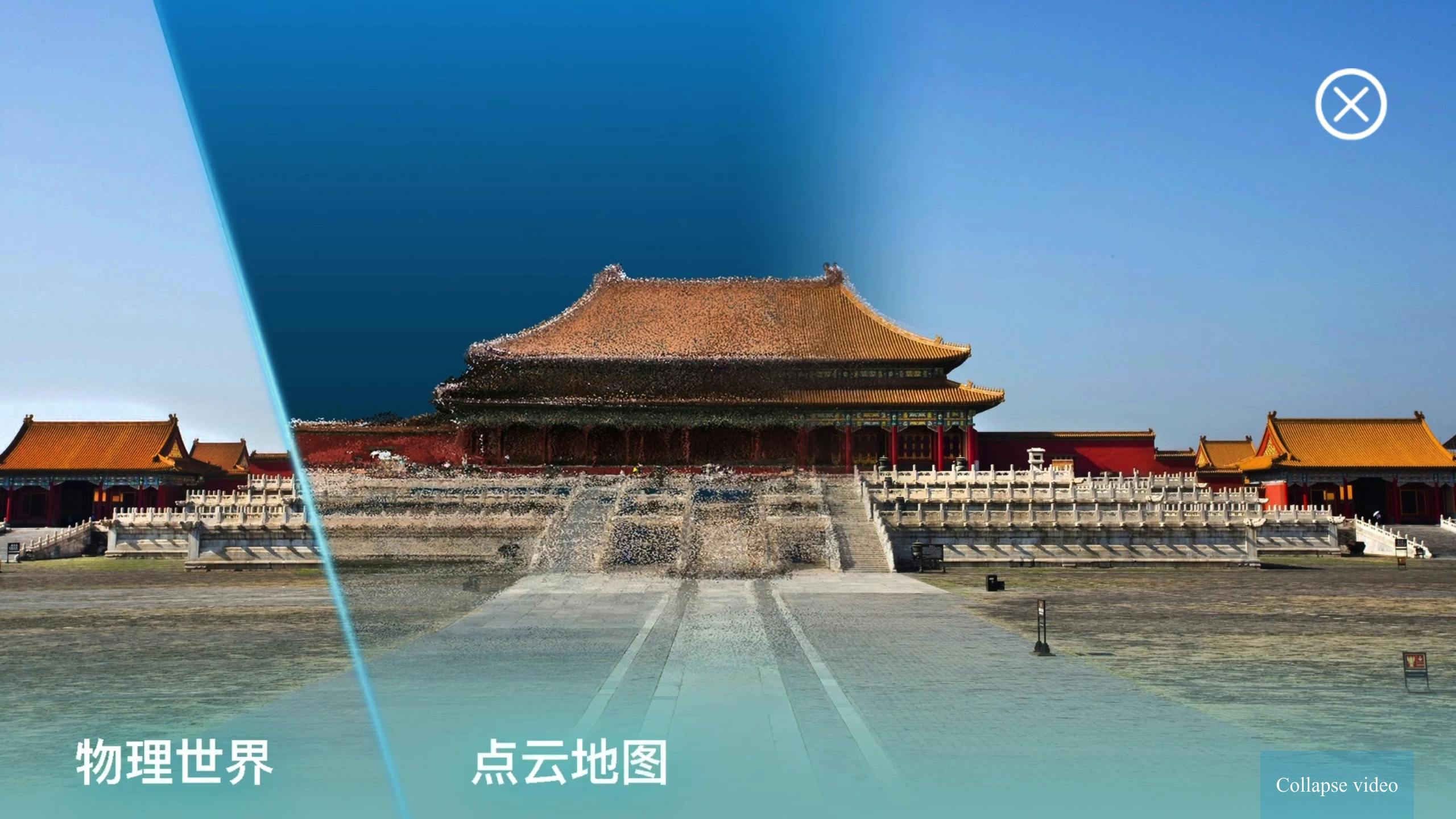
EasyAR is a platform designed for augmented reality (AR) development, offering two main SDKs: EasyAR Mega, suited for large-scale AR experiences, and EasyAR Sense, which focuses on accurate real-world interactions. This makes it a solid choice for marketers looking to create location-based campaigns in busy places like shopping malls.
Technical Capabilities
| Feature | Marketing Application |
|---|---|
| Planar Image Tracking | Recognizing product packaging |
| 3D Object Tracking | Interactive product displays |
| Surface Tracking | In-store navigation |
| Multi-target Recognition | Brand activation campaigns |
| Dense SpatialMap | Immersive retail experiences |
EasyAR integrates seamlessly with Unity3D, making it easier for marketers to develop rich AR experiences without needing advanced coding skills. Its variety of tracking options supports everything from straightforward product demos to engaging, interactive setups.
Subscription Options
- Personal Edition (Free): Includes basic Sparse SpatialMap and motion tracking. Great for testing purposes, but lacks commercial rights.
- Professional Edition ($39/month): Grants full commercial usage, Dense SpatialMap, and Unity AR Foundation support, making it ideal for ongoing campaigns.
- Classic Edition ($1,399 lifetime): A one-time payment unlocks all professional features, making it a practical option for agencies running long-term projects.
For additional flexibility, EasyAR’s Cloud Recognition Service offers API-based pricing starting at $89/month for 10,000 recognitions. This lets marketers scale their resources based on the size of their campaigns.
Performance Considerations
Using EasyAR’s SDKs does require a certain level of technical expertise. Teams without in-house developers should consider partnering with professionals, as the platform is tailored for native mobile apps.
Up next, we’ll dive into Unity’s AR tools and how they can help build engaging mobile experiences.
3. Unity: AR Development Tools
Unity stands out as a top choice for creating interactive AR mobile campaigns. It simplifies cross-platform development with its toolkit, allowing marketers to build once and launch on multiple devices. This approach saves both time and money during campaign creation.
Key AR Features for Mobile Campaigns
| Feature | Use in Marketing | Technical Functionality |
|---|---|---|
| Face Filters | Boosts social media engagement | Tracks facial movements in real-time |
| Object Manipulation | Showcases products in 3D | Enables users to interact with 3D objects |
| Plane Detection | Aids in-store navigation | Recognizes flat surfaces |
| Cross-platform Support | Powers campaigns on various devices | Compatible with iOS and Android |
| Gesture Recognition | Creates interactive experiences | Detects touch and motion inputs |
Development Environment
Unity’s AR development setup includes essential components to kickstart mobile campaigns. A basic AR scene typically features GameObjects like AR Session and XR Origin, along with tools like the AR Input Manager and AR Camera Background. This structure ensures smooth deployment across devices.
For added functionality, tools like Unity MARS and the XR Interaction Toolkit take interactivity to the next level.
Advanced Tools
Unity MARS is ideal for crafting AR experiences that adapt to real-world environments. Its user-friendly authoring system and proxy-based workflow make it especially useful for location-based marketing campaigns. The XR Interaction Toolkit adds more engagement features, including:
- Gesture and placement systems for intuitive interactions
- Annotation tools and haptic feedback for deeper immersion
Pricing Options
Unity offers flexible pricing to fit different project needs:
- Personal Edition: Free, perfect for small-scale projects or testing
- Pro Edition: $200/month, includes advanced tools
- Enterprise Edition: Custom pricing tailored for large campaigns
- Industry Edition: Starts at $450/month, designed for specialized use cases
Performance in Practice
"Unity is the toolkit that has allowed us to realize a new horizon, a shift in the potential of immersive experiences by enabling them to become truly dynamic." – Will Humphrey, Lead Creative & Studio Manager, Sugar Creative
Unity’s reach is hard to ignore, with 3.6 billion monthly downloads. Its compatibility with over 20 platforms ensures campaigns can reach the widest possible audience.
These features make Unity a powerful choice for AR-driven marketing campaigns.
sbb-itb-9ef3630
4. ARKit: iOS Integration Guide
ARKit leverages Unity’s cross-platform capabilities to deliver seamless, high-quality AR experiences specifically for iOS devices. It allows marketers to craft immersive AR campaigns that can engage millions of iOS users with compelling content.
Features That Boost Campaigns
| Feature | Marketing Use | Technical Advantage |
|---|---|---|
| 4K Video Capture | Showcase products in detail | HDR support for sharper visuals |
| LiDAR Integration | Instant product placement | Quick plane detection for accurate object positioning |
| Motion Capture | Create interactive experiences | Tracks body movement using a single camera |
| Scene Geometry | Visualize products realistically | Automatically detects surfaces and applies physics |
| People Occlusion | Blend ads seamlessly into reality | Handles depth for realistic integration with users |
What You Need to Get Started
To ensure smooth performance in your mobile AR campaigns, follow these steps:
-
Set Up Camera Access
Add a "Privacy – Camera Usage Description" to your app’s Info.plist file, explaining its AR purpose. Also, configure an AR-specific placement ID. -
Meet Development Requirements
- Join the Apple Developer Program, which costs $99 per year.
- Test on iOS devices that support ARKit.
- Adjust your project settings to accommodate ARKit features.
Once you’re set up, ARKit’s latest updates can take your campaigns to the next level.
New and Improved Features
The latest ARKit version supports simultaneous use of the front and back cameras, enabling users to interact with AR content using facial expressions while exploring products. RealityKit adds even more functionality, including custom rendering, Metal shader support, and advanced post-processing.
Budget Considerations
ARKit itself doesn’t add extra framework costs. The primary expenses include the $99/year Apple Developer membership, development resources, AR content creation tools, and testing devices.
Performance in Action
Scene Geometry ensures precise mapping of environments, making it easier to visualize products in context. For those without technical expertise, Reality Composer simplifies the process, offering a no-code way to design interactive AR experiences.
These features make ARKit a powerful option for creating immersive and engaging mobile ads.
5. ARCore: Android AR Solutions
ARCore brings advanced tracking and environmental tools to Android campaigns. As Google’s platform for augmented reality on Android devices, it allows marketers to connect with 70.7% of global app users on Android. It seamlessly integrates digital content into real-world environments.
Key Features for Marketing
| Feature | Marketing Use | Advantage |
|---|---|---|
| Visual-Inertial Odometry | Real-time product demos | Tracks device position and orientation accurately |
| Environmental Understanding | In-store navigation | Detects surfaces for better interaction |
| Light Estimation | Product visualization | Adjusts lighting for realistic AR objects |
| Cloud Anchors | Multi-user shopping | Enables shared AR experiences across devices |
Implementation Modes
-
AR Required Mode
This mode ensures high-quality AR experiences, perfect for virtual try-ons or immersive brand interactions. However, it limits access to devices compatible with ARCore. -
AR Optional Mode
Offers the flexibility to install on non-AR devices while still enabling AR features on supported devices. Ideal for campaigns where AR is an enhancement rather than the main focus.
Budget Considerations
- Google Play Store Registration: $25 (one-time fee)
- Basic AR Campaign Development: Starts at $30,000
- Advanced Interactive Features: Ranges from $30,000 to $50,000
- Comprehensive AR Campaigns: Can cost up to $100,000
Success in Action
IKEA’s IKEA Place app uses ARCore to let customers visualize furniture in their homes, helping reduce uncertainty before making a purchase.
Why ARCore Stands Out
Campaigns powered by ARCore see 4× higher user engagement compared to standard mobile apps. This is thanks to its precise depth analysis, geospatial tools, and six degrees of freedom tracking, all of which create a smooth and immersive AR experience.
Technical Details
For the best results, devices should run Android 7.0 or later. ARCore’s ability to automatically detect surfaces and enable physics-based interactions ensures dynamic and engaging AR applications.
6. 8th Wall: Web AR Platform
8th Wall stands out by offering a browser-based AR solution, eliminating the need for app downloads. This approach makes it easier for users to engage with mobile campaigns without extra steps.
Platform Features
8th Wall provides a range of AR tools tailored for marketing:
| Feature | Marketing Use | Technical Needs |
|---|---|---|
| World Tracking | Showcasing products in real space | Requires WebGL support |
| Image Targets | Enhancing print materials | Must be accessed via HTTPS |
| Sky Effects | Creating immersive experiences | iOS 13+ (SFSafariViewController), iOS 14.3+ (WKWebView), or Android browsers |
| Human AR | Virtual try-ons | WebAssembly support |
Broad Compatibility
With its Metaversal Deployment, 8th Wall allows developers to create AR experiences that work across devices like smartphones, tablets, computers, and AR/VR/MR headsets. It supports popular 3D frameworks such as A‑Frame, three.js, and Babylon.js.
Development Tools
Developers have access to several essential resources:
- Cloud Editor: A collaborative, real-time development tool.
- Niantic VPS: Enables precise, location-based AR interactions.
- Lightship Maps: Adds real-world mapping to campaigns.
- Templates: Pre-made solutions for quick project launches.
Pricing Options
8th Wall offers flexible pricing based on usage needs:
| License Type | Cost | Ideal For |
|---|---|---|
| Basic (Free) | $0 | Experimentation and testing |
| Pro | $99/month | Agency campaign development |
| Commercial Monthly | $700/month | Short-term brand campaigns |
| Commercial Annual | $7,000/year | Long-term marketing strategies |
Seamless Integration
8th Wall works well with existing marketing tools and systems:
- Analytics Integration: Connects directly with Google Analytics for campaign tracking.
- API Support: Compatible with React, Vue.js, and custom data sources.
- Content Delivery: A global CDN ensures fast and reliable loading speeds.
- Browser Compatibility: Optimized for all major mobile browsers.
With real-time data integration and smooth compatibility, 8th Wall is a strong option for creating impactful AR campaigns on mobile devices.
Conclusion
Select the AR tool that aligns with your campaign goals and technical requirements. Use the following framework to help identify the best platform for your needs:
Platform Selection Guide
Based on the tool reviews, here’s how to match your campaign objectives with the right AR platform:
| Campaign Goal | Recommended Tool | Key Advantage |
|---|---|---|
| Quick Social Media Reach | 8th Wall | Accessible via web browsers |
| Complex Product Visualization | Vuforia | Advanced tracking features |
| iOS-focused Campaigns | ARKit | Built-in iOS compatibility |
| Android Market | ARCore | Optimized for Android devices |
| Cross-platform Reach | EasyAR | Works across multiple platforms |
| Rapid Prototyping | Unity | Large library of assets |
Performance Considerations
The AR and VR industry is expected to reach $32.1 billion in revenue by the end of 2023. This growth highlights the importance of choosing AR solutions that are easy to integrate and offer measurable returns.
Key Factors for Implementation Success
For a successful AR campaign, focus on these three critical elements:
- Platforms that eliminate the need for app downloads
- Smooth technical integration for showcasing complex ideas
- Tools that allow direct tracking of consumer engagement and ROI
When these elements are in place, your campaign is set up for both immediate impact and long-term benefits.
Real-World Example
Coca-Cola’s "#TakeATaste Now" campaign combined digital screens with mobile AR, driving both instant engagement and stronger brand loyalty.
For marketers, the key is to align your AR platform with your campaign’s objectives while ensuring a seamless experience for users. With AR technology advancing quickly, the opportunities for creating engaging, measurable campaigns continue to expand, offering new ways to achieve business goals.